Install Karma Garage as an app
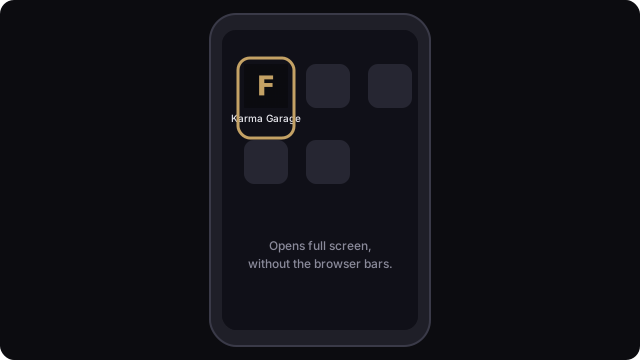
Karma Garage can live on your phone’s home screen, your computer’s dock or your desktop, with its own icon. It opens in its own window without the browser’s address bar and tabs. It is the same site, so you sign in the same way and nothing needs to be downloaded from an app store.
Pick the device you are on. The install option appears in a different place in each browser.
Computer: Chrome or Edge
- Open karma.garage.fan and sign in.
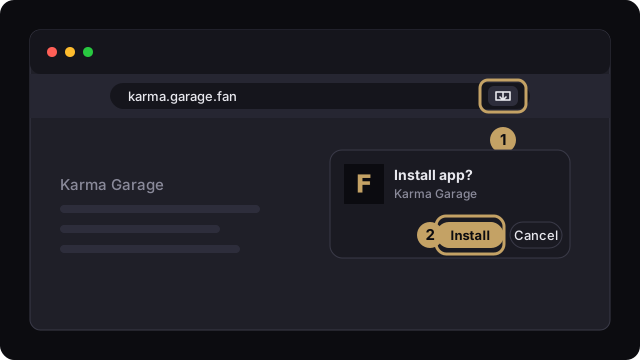
- Click the install icon at the right end of the address bar (a small screen with a down arrow). If you don’t see it, open the browser menu and look for Install Karma Garage or Install page as app (Chrome: under “Cast, save and share”; Edge: under “Apps”).
- Click Install in the box that appears. The app opens in its own window and gets an entry in your Start menu, Launchpad or app list.
Android: Chrome
- Open karma.garage.fan in Chrome.
- Tap the menu (three dots, top right) and tap Install app. Some versions call it Add to Home screen; choose Install on the next screen.
- Confirm. The Karma Garage icon appears on your home screen and in your app list.
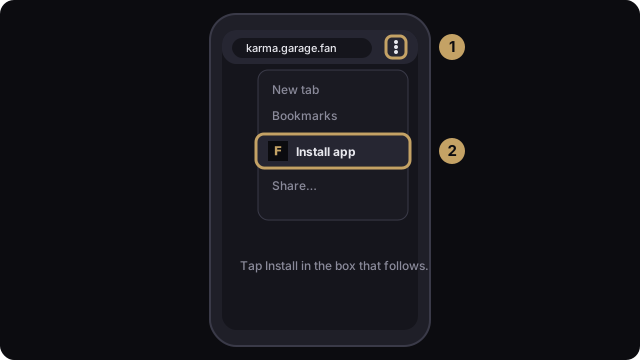
Firefox on Android works the same way: open the menu and tap Install.
iPhone and iPad: Safari
- Open karma.garage.fan in Safari.
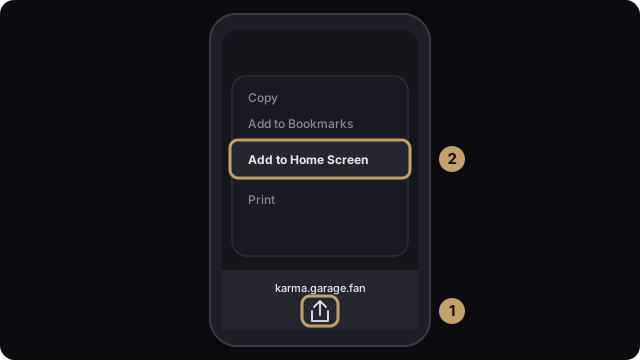
- Tap the Share button (a square with an arrow pointing up) at the bottom of the screen.
- Scroll the list and tap Add to Home Screen.
- Tap Add in the top right.
On iOS 16.4 and newer, Chrome and Firefox also offer Add to Home Screen in their Share menu. On older versions it only works in Safari.
Mac: Safari 17 or newer
- Open karma.garage.fan in Safari.
- In the menu bar choose File, then Add to Dock.
- Click Add.
Firefox on a computer
Firefox on Windows, Mac and Linux has no install option for websites, which is why you won’t find one. To get the app experience on a computer, open Karma Garage in Chrome or Edge and follow the steps above. In Firefox you can still bookmark the site or pin the tab.
No install option showing
- Private or incognito windows don’t offer installation. Use a normal window.
- If the app is already installed, the browser hides the option. Look for the Karma Garage icon instead.
- Update your browser. Install support arrived in Chrome and Edge years ago, and in Safari on Mac with version 17.
- Reload the page once and wait a few seconds. Browsers offer installation after the page has fully loaded.
- On iPhone and iPad the option is in the Share menu, not the address bar, and it can sit below the first screen of actions. Scroll down.
Still stuck? Use the “Report a bug” link at the bottom of any page and tell us your device and browser.